


Article by
Harry Stanley III
Harry Stanley III is a construction marketing strategist and fractional CMO at H&A Marketing. He has helped construction companies grow through website strategy, SEO, paid advertising, branding, lead generation, CRM systems, and professional content. His past work includes helping Meraki Solar generate an additional $3.7 million in revenue in his first year and supporting American Builders as a fractional CMO. Today, Harry works directly with custom home builders and construction companies to build marketing systems designed to generate qualified leads and measurable growth.
A spreadsheet may be the smarter choice for a small commercial roofing operation until bids, follow-ups, and job updates become difficult to manage in one place. A commercial roofing lead tracking CRM can bring that information together, but it also requires setup and upkeep, so it isn’t automatically the right move for every contractor.
Keep things simple when one person can reliably track each facility manager, proposal, next step, and project outcome. As leads and active bids become harder to follow, a spreadsheet can leave communication gaps and make it tougher to see what’s moving through the pipeline.
This guide explains when a spreadsheet is enough, which CRM features matter for commercial roof restorations and replacements, and how common tool types compare for tracking bids, communication, and job performance. It also covers where CRM tools can fall short, helping you choose a system that fits how your team sells and delivers work.
Key Takeaways
- Keep a spreadsheet while one person can reliably track every bid and next step; move to a CRM when handoffs and follow-ups start slipping.
- Use pipeline reports to see where proposals stand and connect sales activity with completed-job performance.
- Keep each property manager’s bid history, calls, emails, and notes together so follow-ups have context.
- Prioritize mobile access, useful integrations, and workflows your team will actually maintain.
- Choose a CRM for the gaps it solves, not for a long feature list; extra complexity can create more work without improving visibility.
CRM reporting on pipeline value and job performance
CRM reports are most useful when they clarify what the numbers mean, not just display totals. A commercial roofing lead tracking CRM can help owners compare bid activity with awarded work and understand how project delivery informs future sales decisions.
It can also help teams review bid follow-ups and close rates. Compare similar opportunities, and distinguish the number of bids won from their total value: these measures answer different questions about sales performance.
Lead Source Tracking
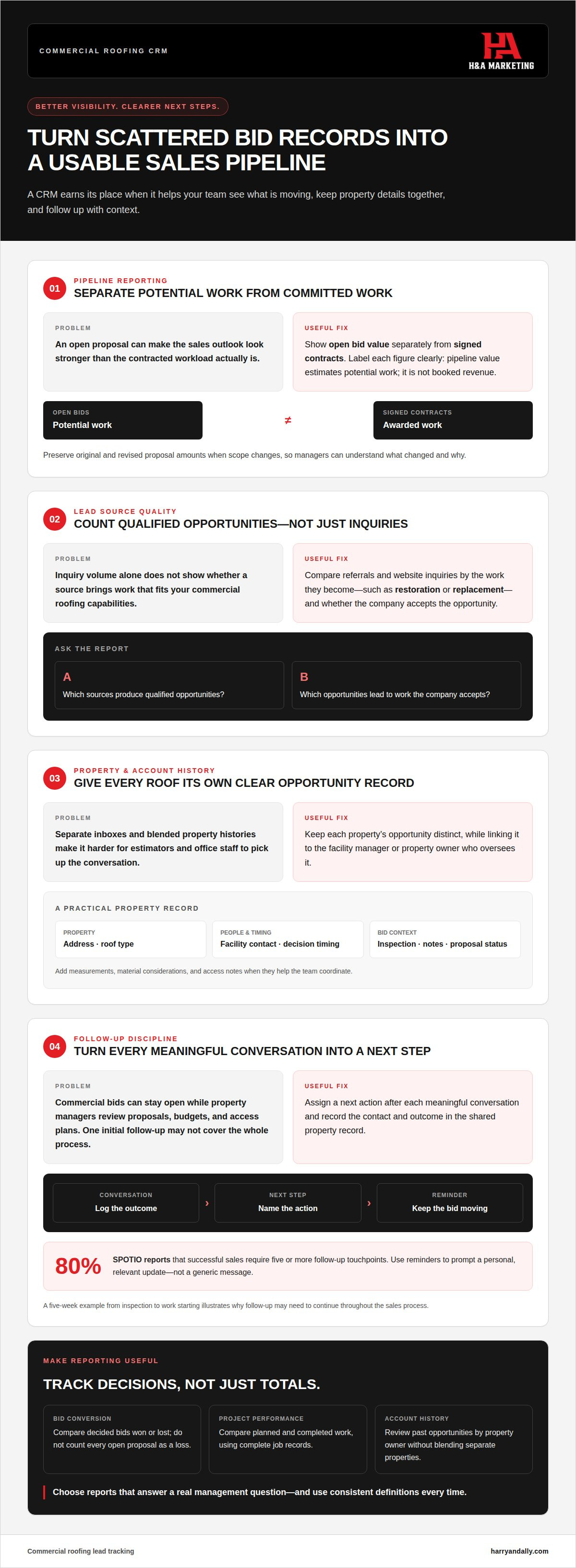
Source reporting is more useful when teams assess lead quality, not just inquiry volume. For example, compare referral leads and website inquiries by the kind of commercial work they become, such as restoration or replacement. This can show whether a source brings projects aligned with the company’s capabilities, even if it generates fewer inquiries overall.
Keep the reporting question specific: which sources produce qualified opportunities, and which lead to work the company accepts? A supplier introduction may lead to a strong-fit project, while another channel may bring inquiries outside the contractor’s preferred scope. Reviewing these differences helps owners decide where sales attention belongs.
Pipeline Visibility and Value
A pipeline total estimates potential work; it isn’t booked revenue. Report open bid value separately from signed contracts, and label each figure clearly. Otherwise, a large proposal still under review can make the sales outlook appear stronger than the contracted workload supports.
Review value by project type and account, then examine what changed between proposal and award. For example, if a replacement bid changes after a scope revision, preserve both the original estimate and the updated amount. This gives managers forecasting context and helps explain changes in reported totals.
Bid Follow-Ups and Close Rates
Close-rate reporting needs a defined set of opportunities. Compare bids with a recorded decision rather than treating every open proposal as a loss. Review decision reasons alongside outcomes: a bid lost on timing may call for a different response than one lost because the project scope didn’t fit.
When reviewing follow-ups, look for unanswered client questions and proposals without a documented decision. Reports should help a sales manager choose a practical next action, such as clarifying an exclusion or confirming who approves the work. That makes reporting useful for coaching, not just a retrospective scorecard.
| Reporting approach | What it measures | Useful decision | Potential blind spot |
|---|---|---|---|
| Bid conversion | Decided bids won or lost | Review sales outcomes | Open bids may be excluded |
| Awarded value | Value of signed work | Separate contracts from prospects | Scope changes need context |
| Project performance | Planned and completed work records | Review delivery patterns | Incomplete job records distort results |
| Account history | Past opportunities by property owner | Plan relationship follow-up | Multiple properties can be conflated |
Choose reports that answer a real management question, then use consistent definitions in every review.
Regularly compare bid assumptions with project closeout records. If a job’s final scope differs from its proposal, record why so future estimates can reflect what the team learned. Reporting is more useful when sales and operations records explain changes, rather than leaving owners to interpret totals without context.
Customer communication and follow-ups
Commercial roofing bids can remain open between inspection and scheduled work while property managers review proposals, budgets, and access plans. A CRM ties each contact, conversation, and next action to the right property and opportunity. Estimators and office staff can then use one shared record instead of separate inbox threads.
Build a Useful Property Record
Custom fields help a contact record reflect commercial roofing work rather than a generic sales process. Capture the property address, roof type, facility contact, inspection date, project type, and decision timing. Add fields for measurements, material considerations, access notes, and proposal status when they help the team coordinate.
For example, a facility manager overseeing several buildings may have a separate opportunity for each roof. Link each opportunity to the same contact, while keeping inspection notes, estimates, and proposal history distinct. Roofers can review the relevant property details before calling instead of asking the manager to repeat information.
Plan Follow-Ups Around the Bid
Assign a next action after each meaningful conversation: send revised measurements, answer a scope question, or confirm whether the proposal reached the decision-maker. A five-week example timeline between inspection and work starting illustrates why one initial follow-up may not cover the full commercial sales process. Record each contact and its outcome.
SPOTIO reports that 80% of successful sales require five or more follow-up touchpoints. A CRM can help teams plan those contacts and see which bids have gone quiet. Use reminders to prompt a personal update, not a generic message that ignores the property’s needs.
Texting, Portals, and AI Support
Two-way texting can keep a brief exchange attached to the property record. For example, a roofer’s message confirming an inspection window gives office staff context when the facility manager replies. Keep estimates and scope decisions in the formal proposal process so a quick text doesn’t become the only record of a change.
Customer portals can let property managers view project documents or updates, while vendor portals may organize supplier coordination. Their value depends on whether they reduce email handoffs for the work at hand. AI agents may help draft routine replies or sort incoming requests, but staff should review messages involving scope, measurements, materials, or schedule commitments.
Automation can send an instant acknowledgment after a web inquiry, then assign someone to review the request and follow up. It shouldn’t suggest that an inspection is scheduled or an estimate is ready before the team confirms those details. For a five-week project timeline, use reminders for inspection, proposal delivery, decision follow-up, and work-start communication. Each update should state the next step and who owns it.
Clear communication depends on both process and lead quality; commercial roofing marketing can help connect lead capture with a consistent follow-up path.
What are must have Roofing CRM features?
The right CRM supports a commercial roofing sales cycle without forcing every opportunity into the same workflow. Prioritize clear ownership, useful integrations, and actionable reports.
The best option depends on your sales model: a spreadsheet, general CRM, roofing CRM, or platform combining sales and job management.
Complex Commercial Sales Cycles
A commercial roofing opportunity can involve an inspection, scope review, proposal, budget approval, and coordination with building occupants. That differs from a simpler residential sale, where the decision path may be shorter. Set stages that match your restoration and replacement workflows, then record who owns each next step.
Repeat relationships matter, too. Keep a facility manager’s past bids and completed work connected to the contact record. That history helps estimators understand previous decisions and identify upcoming roof needs without treating each inquiry as a new relationship.
CRM Fit by Company Size and Sales Model
A spreadsheet can suit a small roofing business when one person maintains it and handoffs are simple. A growing team may need role assignments, reports, and integrations with accounting, email, or project tools already in use. A roofing CRM may suit teams seeking industry-specific stages; an integrated platform can connect sales with operations and crew coordination.
Choose by workflow, not feature count. A contractor managing restorations, replacements, and recurring property accounts needs a different setup from a residential-focused roofing business. Test whether the system can support growth from a five-person crew to multiple crews without making everyday updates harder.
Automated Lead Nurturing and Follow-Up
Automation should prompt the next useful action, not replace judgment. Set a reminder for a commercial lead that has gone untouched for two weeks, or assign a task when a proposal moves to decision pending. Tailor messages to the opportunity stage so a facility manager receives a relevant update, not a generic sales sequence.
Reports should show overdue tasks, stage movement, and lost opportunities. Keep a human review step for changes to scope, schedule, or proposal terms. This lets the CRM handle reminders while estimators and sales staff manage decisions that require context.
Handle U.S. lead records carefully and control access. Limit who can view, export, or edit contact details, property notes, and project records; privacy requirements can depend on the information and circumstances. A CRM doesn’t replace a sound data-handling process, so define access by role and remove it when responsibilities change.
Mobile CRM access for field teams
A mobile CRM lets estimators update commercial roofing opportunities from inspections and job sites. Prioritize a clean interface, limited administration, and field access your team will actually use.
For estimating, proposals, and project management, prioritize integrations with the accounting, email, and project tools your business already uses. Connect estimating and proposals where possible, so measurements, bid status, and project handoffs don’t depend on re-entering the same details.
What Field Teams Need on Mobile
An estimator inspecting a commercial roof should be able to open the correct property record, review assigned tasks, and update the opportunity before leaving the site. That quick update can capture inspection progress, a follow-up owner, or the office team’s next action.
Mobile CRM software is more likely to be used when it has a clean interface, requires little administration, and offers an app estimators will use on-site. Keep the field workflow focused: open the opportunity, record the update, assign the next step, and move on. If routine entries take too many screens, staff may put them off until details are harder to recall.
CRM Versus Field-Service Software
A CRM centers on relationships and the sales pipeline, from first inquiry to signed contract. Field-service software focuses more on work after the sale, such as project timelines, crew assignments, and material needs. Some roofing platforms combine customer management, project management, and workforce coordination, reducing handoffs between office and field.
Choose based on the gap your team needs to close. If bids and property-manager conversations are hard to track, prioritize CRM functions. If signed work is difficult to organize across timelines and crews, give project coordination greater weight. A combined platform makes sense when both needs belong in one workflow.
Keep Updates Connected to Office Work
Set a simple mobile process for each inspection: confirm the property, update the opportunity stage, add field notes, and assign the next action. The office can then prepare an estimate or proposal using current information, rather than chasing an estimator for a basic status update.
Connect the CRM to your accounting, email, and project management tools. These integrations can help prevent duplicate entry and keep sales and operations aligned. Before choosing software, map a real restoration or replacement from initial inspection through signed proposal and project handoff. Identify where information is entered, who uses it next, and which system holds the current record.
Mobile access also supports job updates after a contract is signed. A field lead can record a timeline change or crew assignment while office staff review the same job record. Roofing CRM systems can track jobs in real time, and job-management dashboards can display timelines, crew assignments, and material needs. This visibility helps sales, operations, and field teams share project status instead of relying on separate notes.
Commercial roofing CRM limitations
A CRM organizes information; it doesn’t guarantee accurate records, timely decisions, or better bids. Common mistakes include choosing a platform with more features than the team will use, expecting it to fix inconsistent follow-up, and automating messages without checking their accuracy.
These limits matter in commercial roofing, where inspection findings, proposal revisions, access needs, and scheduling can change during a sale. Treat the CRM as a shared progress record, not the authority on actual roof conditions or project scope. Staff still need to review changes before revising a proposal or committing to a schedule.
Complexity Can Outrun the Workflow
A platform can combine customer records, project management, and workforce coordination, but the combined features may add steps. If an estimator must complete several fields after every inspection, updates may be delayed or skipped. Start with the decisions the team needs to make, such as which bids need follow-up or which signed projects need an operations handoff.
Then remove fields that don’t support those decisions. For example, a roof restoration lead may need a property contact, inspection status, proposal stage, and next action. If the system also requires unrelated residential fields, staff may enter inconsistent data just to proceed.
Automation Needs Human Review
Automatic reminders can flag an untouched bid, but they can’t interpret every reason for delay. A facility manager may be waiting on internal approval, while another property may need a revised scope. Use automation to assign a task, then let the account owner choose a relevant message and update the record after the conversation.
Scheduling has similar limits. A CRM may display a project timeline, but field conditions, crew availability, and material needs still require operational review. Don’t treat a calendar entry as confirmation that work can begin. Record who approves the schedule and where the current update belongs.
Data Quality and Adoption Set the Ceiling
Reports reflect what staff enter. If one estimator marks a proposal “sent” while another uses “pending,” pipeline reports won’t clearly describe actual progress. Define each sales stage, assign one owner per opportunity, and review sample records during regular team meetings.
Roll out changes with a pilot crew before implementing them company-wide. Test a real commercial replacement from first inquiry through handoff, noting where information is duplicated or lost. Include office staff and field users in the review: a screen that works at a desk may slow an estimator on-site.
Choose for the Gaps, Not the Demo
Before selecting software, map a real bid and an active job. Confirm that the platform supports required integrations, captures the fields your team uses, and makes next actions easy to find. Compare those tasks against your actual workflow, not a feature presentation.
A CRM is a poor fit if it creates more administration than visibility. Keep the setup focused, review the process with users, and adjust only when a specific handoff or reporting gap emerges.
H&A Marketing: Lead Generation
H&A Marketing helps commercial roofing contractors strengthen the path from online discovery to qualified project inquiries. If your CRM is ready to track opportunities but your pipeline needs more suitable restoration and replacement leads, lead generation can connect marketing activity with sales follow-up.
That starts with the way prospects find and assess your business. Lead generation for construction companies can work alongside a clear website, search engine optimization, and consistent branding. Together, these elements help facility managers understand your capabilities and take the next step.
Turn to H&A Marketing when your tracking process is in place but your lead flow, website, or search visibility needs a more coordinated approach. Contact H&A Marketing to discuss the right next step for your commercial roofing business.
Build a Lead System That Supports Your Next Bid
Your next step is to connect marketing activity with the commercial opportunities your team wants to pursue. Decide which inquiries qualify, what information sales needs at handoff, and which pipeline signals matter to owners. A commercial roofing lead-tracking CRM is most useful when those decisions guide what your team records and reviews.
H&A Marketing can help connect that system to how prospects find and assess your company. Its Website Design, Search Engine Optimization, and Logo Design & Branding offerings support a consistent presence for commercial roof restoration and replacement prospects. The goal is a clearer path from discovery to inquiry, with lead information ready for your sales process.
Choose one improvement to move forward: strengthen online visibility, clarify your brand, or attract more qualified project inquiries. A focused next step can make it easier to see what deserves attention across your marketing and pipeline.
With a practical system behind each opportunity, your team can spend less time chasing scattered details and more time moving the right bids forward.
Frequently Asked Questions
Do small roofing companies need a CRM or is a spreadsheet enough?
Either can work; the deciding factor is whether the record stays reliable as responsibilities shift. A spreadsheet may suit an owner handling inquiries alone, but a shared file can become unreliable when estimators and office staff update separate copies. Consider how you’ll preserve the latest proposal and contact history if the person managing a bid is unavailable. Choose the simplest tool that keeps the working record clear.
How Is a Roofing CRM Different From a Standard CRM?
A roofing CRM may be designed around roofing-specific work, but the label alone doesn’t show whether it suits commercial sales. Test a realistic scenario: one property manager oversees several buildings, with separate restoration and replacement opportunities. See whether the system keeps those opportunities distinct while retaining the shared relationship. This practical test reveals more than a feature list and helps distinguish a useful fit from software aimed at a different roofing model.
What Problems Does a Roofing CRM Actually Solve, And What Results Can You Expect?
A CRM can clarify who owns a prospect relationship and what the company last communicated. For instance, if a facility manager calls about a second building, staff can check whether the first property’s proposal is still under review before responding. Records must stay current for continuity. Don’t treat software adoption as proof of improved sales; review whether the system changes decisions or simply adds another place to enter information.
What features should a CRM have for tracking commercial roofing leads?
Prioritize features that protect record quality as well as organize sales work. Searchable contacts, duplicate detection, role-based access, and a straightforward way to correct outdated details can reduce confusion as accounts change hands. Consider whether users can export records in a usable format if processes change later. The best feature set supports your team’s actual commercial workflow without making routine updates difficult.
Can roofing CRMs track leads from calls, web forms, referrals, and paid ads?
Yes, provided each channel’s information enters the CRM consistently. For calls, staff can record the source during intake; web forms and paid campaigns can pass source details through a connection; referrals can be labeled when entered. Use agreed naming conventions, such as one consistent label per campaign. This helps prevent the same channel from appearing under several spellings and makes comparisons easier to interpret.
How can commercial roofers set up lead stages and sales pipelines in a CRM?
Keep the sales pipeline separate from production tracking so a signed contract isn’t mistaken for a completed job. Define what moves a bid to the next stage, then test those definitions against recent opportunities. If staff disagree about whether a proposal is still under review or inactive, clarify the stage criteria. Clear distinctions ease handoffs and keep sales reporting separate from job delivery.
What data should commercial roofing companies record for each lead and property?
Organize information by both organization and individual property. A property manager’s contact details belong with the person, while building-specific access instructions, ownership details, and project documents belong with the relevant site. This structure matters when one organization manages multiple roofs. Keep notes tied to the correct record, and avoid copying sensitive or irrelevant personal details into project fields visible to a wider group.
What are the best CRM software options for commercial roofing contractors?
The best fit depends on the contractor’s sales model: options include a spreadsheet, general CRM, roofing CRM, or platform combining sales and job management. Prioritize workflows suited to commercial projects, mobile access, useful integrations, and reports your team will maintain.
