
CRM for Custom Home Builders: How to Pick and Set Up Your Pipeline


Article by
Harry Stanley III
Harry Stanley III is a construction marketing strategist and fractional CMO at H&A Marketing. He has helped construction companies grow through website strategy, SEO, paid advertising, branding, lead generation, CRM systems, and professional content. His past work includes helping Meraki Solar generate an additional $3.7 million in revenue in his first year and supporting American Builders as a fractional CMO. Today, Harry works directly with custom home builders and construction companies to build marketing systems designed to generate qualified leads and measurable growth.
A CRM that doesn’t match how custom homes are sold can create more admin, not clarity. The right crm for custom home builders should reflect the real journey from a website inquiry or referral to a consultation, design discussions, a proposal, and a signed agreement.
That journey can take time, and prospects may reach out through several channels. Without a shared record, it’s easy to lose track of who needs a reply, what’s already been discussed, and what should happen next. A generic pipeline can make this worse if its stages don’t match the way your team works.
This guide explains how to evaluate a CRM against your sales process and set up a pipeline your team can use consistently. You’ll learn what to compare in sales-focused CRMs and construction management platforms, how to define stages around homeowner decisions, and how to plan for follow-up, team adoption, and setup. The goal is a reliable view of active prospects, more relevant communication, and a clearer connection between marketing activity and signed projects.
Key Takeaways
- Choose a crm for custom home builders that reflects how your team moves homeowners from inquiry to agreement, not just a generic sales funnel.
- Set pipeline stages around your actual process, from first review and consultation through planning, proposal, and a recorded outcome.
- Compare tools by workflow fit, ease of use, reporting, permissions, and connections to systems your team already relies on.
- Start with essential fields and clear ownership for inquiries, record updates, and follow-up, then test and refine the setup with your team.
- Use CRM tracking as one part of a connected marketing system that helps relate website inquiries and marketing activity to qualified opportunities.
What a CRM for custom home builders should actually solve
A customer relationship management system, or CRM, keeps prospect details, conversations, pipeline status, and follow-up in one shared place. The general concept is explained in Customer Relationship Management (CRM). For a custom builder, its practical value is simple: the team can see who has made contact, what they’re considering, and what should happen next.
A homeowner may move from an early website inquiry to a consultation, design discussion, and proposal over an extended decision process. If context lives in one person’s inbox, a handoff can mean missed details or repeated questions. A shared prospect record gives the team a common reference instead of a patchwork of inbox threads, personal notes, and spreadsheets.
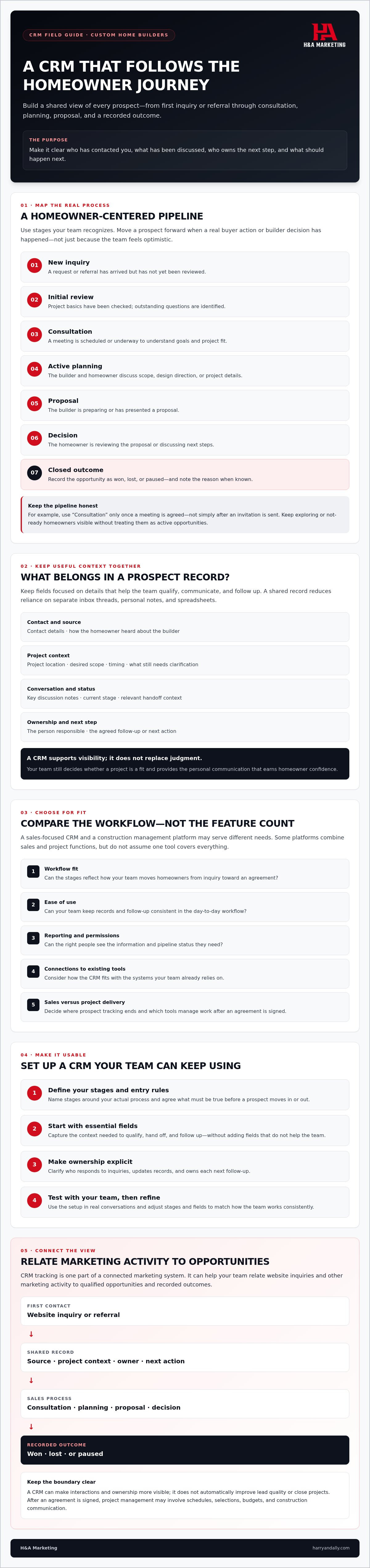
A useful record might include contact details, how the homeowner heard about the builder, project location, desired scope, timing, key discussion notes, current stage, and next action. Keep fields focused on information that helps your team qualify and follow up. A CRM supports visibility; it doesn’t replace judgment about whether a project is a fit or the personal communication that earns a homeowner’s confidence.
Where a CRM fits in the custom-home sales journey
The journey might begin with a website inquiry, referral, or another first contact. A team member reviews the request, arranges a consultation if appropriate, records planning discussions, and tracks whether a proposal is being prepared or considered. At each handoff, preserve the relevant context, name the person responsible, and record an agreed next step. A clear construction website design can present the builder’s work and provide an inquiry path, while the CRM helps the team manage what follows.
Not every inquiry is ready for a consultation. Some homeowners are exploring ideas; others have a defined project and are prepared to discuss next steps. Record what you know and what still needs clarification, rather than treating every new contact as a qualified opportunity.
What a CRM does not replace
A CRM is primarily for prospect and sales tracking. Once an agreement is signed, project management may involve schedules, selections, budgets, and construction communication. Some platforms combine sales and project functions, but don’t assume a CRM covers every operational need. Decide where the sales process ends and which tools manage project delivery.
Email, calendars, and estimating tools may still be part of the workflow. A CRM can help the team see interactions and ownership, but it won’t automatically improve lead quality or close projects. Consistent qualification, timely follow-up, and clear, personal communication still depend on your process and people.
Build CRM stages around the custom home buying decision
A useful crm for custom home builders tracks real movement in a homeowner’s decision, not simply how hopeful the team feels about a lead. The pipeline gives everyone a shared view of each prospect’s status and the next action needed to move the conversation forward.
Start with stages your team recognizes, then tailor the names and entry criteria to your actual sales process:
- New inquiry: A request or referral has arrived but hasn’t been reviewed.
- Initial review: Someone has checked the project basics and identified what still needs clarification.
- Consultation: A meeting is scheduled or underway to understand the homeowner’s goals and fit.
- Active planning: The team and homeowner are discussing scope, design direction, or other project details.
- Proposal: The builder is preparing or has presented a proposal.
- Decision: The homeowner is reviewing the proposal or discussing next steps.
- Closed outcome: The opportunity is recorded as won, lost, or paused, with a reason where known.
Define what must be true before a prospect enters or leaves each stage. For example, move a lead to “Consultation” only once a meeting is agreed, not just because the team sent an invitation. Clear criteria keep the pipeline honest and make stalled opportunities easier to identify.
Choose stages that reveal the next decision
Each stage should point to a buyer action or a builder decision. If a homeowner is researching but hasn’t shared enough project detail, keep them visible in a nurture or not-ready status rather than among active opportunities. If a project pauses or closes, note why when you know. That context can help the team review patterns without treating every inquiry as a fit.
The typical builder runs a small business, according to NAHB’s profile of its builder members. Keep the pipeline clear and manageable rather than building it around an enterprise-level process.
Track context without overwhelming the team
Capture information that helps qualify the opportunity and personalize the next conversation. Depending on what the homeowner voluntarily shares, that might include project goals, timing, budget context, and communication preferences. Record the inquiry source and a concise conversation summary, too. “Wants to discuss a contemporary home and is still exploring timing” is more useful than a vague “follow up.”
Choose only fields your team will keep current and use to make decisions. If a detail doesn’t guide qualification, ownership, or follow-up, it may not need a dedicated field. If website inquiries are part of your pipeline, consider construction lead generation alongside how those inquiries are captured and tracked.
Compare CRM options by fit, not feature count
The right CRM for a custom builder supports the sales process without adding busywork. Compare options against the work your team needs to do: manage consultations, track proposal decisions, see who owns each inquiry, and keep the next action visible. A long feature list matters less if staff can’t find the information they need or won’t keep records current.
Before choosing, test the system with realistic questions:
- Can you adapt stages and prospect records to match your consultation and proposal process?
- Can a team member see the inquiry source, record owner, recent communication, and next action together?
- Can you view active opportunities without relying on excessive manual data entry?
- Can the right people access the records they need, and can you understand what reports are based on?
Ask vendors to demonstrate these tasks using a sample homeowner inquiry. Confirm current features, permissions, reporting, and connection options in the vendor’s documentation before making a decision. Don’t assume a feature works with your existing website or tools just because it appears in a sales presentation.
CRM versus the rest of the marketing and operations stack
Each tool has a distinct job. A CRM focuses on prospect relationships and sales progress. It may connect with other systems, but verify the available connections and their limits for the specific platforms you use.
| Tool | Primary responsibility |
|---|---|
| CRM | Organize prospect records, interactions, ownership, and pipeline activity. |
| Project management | Coordinate work, schedules, and tasks after a project moves into delivery. |
| Email marketing | Send planned communications to selected audiences, according to the tool’s capabilities and your process. |
| Website lead capture | Give prospective homeowners a way to submit an inquiry and share initial project details. |
These tools may share information, but don’t assume they do so automatically. Check what data moves between systems, whether staff need to enter it again, and how errors or duplicate records are handled. For a broader view of how inquiries fit into a builder’s pipeline, explore lead generation for construction companies.
Look at the full workflow, from website inquiry to sales follow-up, rather than expecting one platform to manage every marketing and construction task.
Set up a CRM your team will keep using
A CRM earns its place when it helps your team take the next step, not when it stores the most information. Set it up in phases, then test the workflow against the way your team handles custom-home inquiries.
- Map the process. Write down how an inquiry moves from first contact to a signed agreement, a pause, or another closed outcome.
- Choose essential fields. Include only the details staff need to understand the opportunity and follow up well.
- Configure stages and ownership. Decide who handles new inquiries, who updates records, and who owns the next action.
- Test and refine. Walk through realistic situations, note where the process gets confusing, and adjust before expanding its use.
Set response and review expectations that fit your team’s capacity. Decide who checks new inquiries, how the team flags records needing attention, and when active opportunities are reviewed. There’s no universal response benchmark for every builder. Set a standard your team can meet consistently, with clear ownership when priorities shift.
Start with clean records and a simple workflow
Import only prospect information your business has a valid basis to use. Remove obvious duplicates and check key details before relying on the records. Then test the workflow with representative situations: a new website inquiry, a referral that needs review, a consultation that moves into planning, and a prospect who pauses. Write a short process for entering, updating, assigning, and closing records.
A CRM record is actionable when it shows an owner, current status, and next step. If one is missing, the team may not know who should move the conversation forward.
Measure pipeline health, not activity for its own sake
Review inquiry sources, movement between stages, stalled opportunities, and completion of assigned follow-up. Keep inquiry volume separate from qualified opportunities and signed projects. They represent different points in the sales process. If prospects aren’t progressing, examine qualification, follow-up habits, and stage definitions before assuming the CRM itself is the problem.
Use reports to identify questions worth investigating, not to claim that a particular marketing channel or process change caused a sale. Refine the workflow based on what the records show and what your team can maintain. A practical crm for custom home builders should support useful decisions without turning record updates into busywork.
Connect CRM tracking to a stronger builder marketing system
A CRM works best as one part of a connected marketing system. Your website presents your work and invites homeowners to get in touch. Search and other marketing activity help prospective clients find you. Lead capture gathers their initial details, while CRM tracking helps your team understand what happens after an inquiry arrives.
For crm for custom home builders, the handoff matters. A sales team should be able to use the information a homeowner shares to shape a relevant first conversation, then record useful follow-up context. Keep expectations grounded: CRM tracking can make activity easier to review, but it doesn’t guarantee that tools connect or that every inquiry becomes a qualified opportunity.
Make inquiry sources and follow-up easier to understand
Agree on a consistent way to record where each inquiry came from, such as search, an advertisement, social media, or a referral. Then review source information alongside opportunity fit and pipeline progress. Raw inquiry volume alone won’t tell you whether a channel is attracting homeowners whose goals match the work your team takes on.
Review your inquiry form with the same practical lens. Ask for enough context to guide a useful first conversation, but avoid collecting details your team won’t use. A question about project goals, for example, can help staff prepare relevant questions. Check that source labels and any information passed between tools are accurate before relying on them for reporting.
Choose a next step that fits your current process
Before changing tools, write down the inquiry path your team follows today. Note where a homeowner first gets in touch, who responds, what information is captured, and where communication tends to stall. This map can help reveal whether the friction sits in the website experience, lead capture, record ownership, or follow-up habits.
Start with the clearest gap, then decide whether the process or the tool needs to change. H&A Marketing works across construction marketing services as a connected system, with CRM tracking considered as part of the broader prospect journey, not as CRM software or custom software development.
Make your next CRM decision fit the way you sell
The right crm for custom home builders reflects the homeowner’s path from first inquiry to signed agreement. Build stages around real decisions, choose a system your team can keep current, and make sure each active record shows who owns it and what happens next.
Keep the CRM in its proper role: it supports prospect tracking, but it doesn’t replace qualification, thoughtful follow-up, or the tools your team uses to manage construction. When website inquiries, marketing activity, and sales follow-up are easier to connect, you can get a clearer view of which opportunities are moving forward.
H&A Marketing specializes in digital marketing for construction companies, with services spanning website design, SEO, lead generation, social media, and professional photo and video. These services can work as parts of a connected marketing system, with CRM tracking considered as one part of the prospect journey, not a standalone software product.
Start with the inquiry path you have today, then improve the steps that create friction. A practical pipeline can help your team move forward with more clarity and confidence.
Frequently Asked Questions
What is the best CRM for custom home builders?
The best CRM is the one that fits your sales stages, team habits, reporting needs, and existing tools. Before choosing, test a typical inquiry from first contact through consultation and proposal. Check whether staff can see the prospect’s context, owner, current status, and next step without unnecessary data entry. Avoid choosing on feature count alone, and verify important capabilities or connections in the provider’s current documentation.
Do custom home builders need a CRM?
A CRM can help when inquiries arrive through several sources or homeowners need time to make a decision. It keeps prospect context, ownership, status, and next steps visible, which can reduce reliance on scattered inbox threads and personal notes. A small team may begin with a simple, consistently maintained process. A CRM organizes follow-up, but it doesn’t create qualified leads by itself or replace sound qualification and personal communication.
What should a custom home builder track in a CRM?
Track the details your team needs to understand and follow up on each opportunity: contact information, project goals, inquiry source, communication history, current stage, record owner, and next action. Timing or budget context can be useful when the homeowner has shared it and it’s relevant to the conversation. Keep fields manageable. If staff won’t use a detail to qualify, communicate, or make a decision, it may not belong in the record.
How many stages should a custom home builder CRM pipeline have?
There’s no universal number of stages for a builder’s pipeline. Use enough to show meaningful decisions, such as moving from a new inquiry to consultation, active planning, proposal, and a recorded outcome. Define what must happen before a prospect enters or leaves each stage. Those definitions matter more than hitting a prescribed stage count. Remove any stage that doesn’t change what the team does next or clarify the opportunity’s status.
Can a CRM replace construction project management software?
Usually, a CRM organizes prospect relationships and sales progress, while project management software coordinates work after a project begins. Some platforms may cover parts of both jobs, but capabilities vary, so verify them against your team’s needs and current product documentation. Assign each system a clear role. That helps keep prospect notes, project schedules, construction tasks, and client communications organized without assuming one tool manages every part of the business.
How do you get a sales team to use a CRM consistently?
Involve the team in shaping the workflow, keep required fields limited, assign record ownership, and document simple rules for updating records. Test the process with realistic inquiries, from a new contact to a proposal under review. Then ask whether the system makes the next action easier to see. Software alone can’t guarantee consistent use. A practical process, clear expectations, and leaders who follow the same rules help build the habit.
How can a CRM help custom builders understand where leads come from?
Consistent source recording lets a builder review where inquiries originate and how they move through the pipeline. That view depends on accurate records and reliable source information. It doesn’t prove that a particular channel caused a sale. Review source data alongside qualification, project fit, and later pipeline movement, rather than judging marketing by inquiry counts alone. This helps distinguish channels that attract contacts from those associated with relevant opportunities.
